
Bref
serverless.yml に直接記述したくないときに使える.たとえばシークレットなど❗️
at deployment time(デプロイ時)と at runtime(実行時)
パラメータを環境変数に登録するタイミングとして,大きく「デプロイ時」と「実行時」がある.Bref のドキュメントでは以下のように書いてある.
- at deployment time (simplest)
- at runtime (more secure)
「デプロイ時」は serverless deploy コマンドを実行して AWS Lambda 関数をデプロイするときに AWS Systems Manager Parameter Store に登録したパラメータを環境変数に登録する.よって,AWS Lambda 関数のコンソールを見ると環境変数の値が見える.
「実行時」は AWS Lambda 関数の初回実行時(コールドスタート)に動的に AWS Systems Manager Parameter Store に登録したパラメータを環境変数に設定する.AWS Lambda 関数のコンソールには bref-ssm:xxx というプレフィックス付きの文字列を登録することになる.
さっそく試してみる \( 'ω')/
AWS Systems Manager Parameter Store にパラメータを登録する
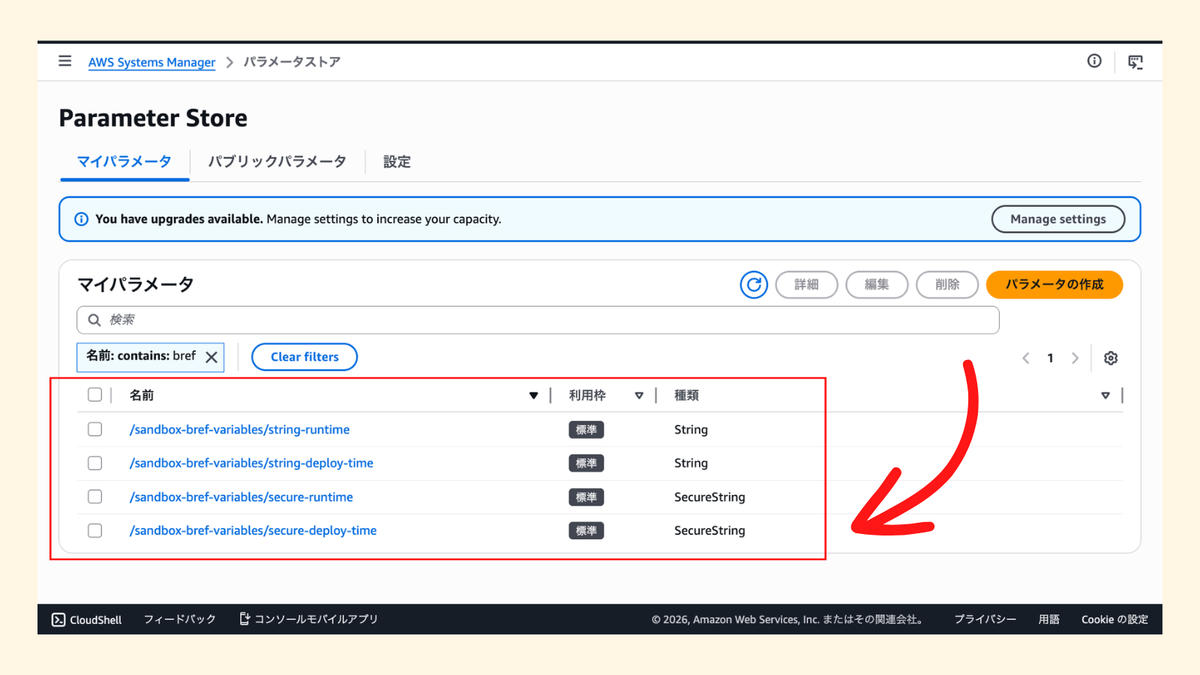
まずは検証用のパラメータを「4種類」AWS Systems Manager Parameter Store に登録しておく.
$ aws ssm put-parameter --name '/sandbox-bref-variables/string-deploy-time' --type String --value 'string-deploy-time'
$ aws ssm put-parameter --name '/sandbox-bref-variables/string-runtime' --type String --value 'string-runtime'
$ aws ssm put-parameter --name '/sandbox-bref-variables/secure-deploy-time' --type SecureString --value 'secure-deploy-time'
$ aws ssm put-parameter --name '/sandbox-bref-variables/secure-runtime' --type SecureString --value 'secure-runtime'
👾 composer.json
プロジェクトをセットアップするために composer.json を準備する.
{
    "require": {
        "bref/bref": "^3.0",
        "bref/secrets-loader": "^1.0"
    }
}
今回は bref/bref と AWS Systems Manager Parameter Store に登録したパラメータを取得するために使う bref/secrets-loader をインストールする.
ちなみに Bref は2026年2月末にリリースされた最新の Bref 3.0 を使う.
最後に composer install を実行しておけば OK👌
$ composer install
👾 serverless.yml
次に Serverless Framework の serverless.yml を準備する.ポイントは環境変数を設定する environment で「デプロイ時」の場合は ${ssm:/xxx} というフォーマットで指定して,「実行時」の場合は bref-ssm:/xxx というフォーマットで指定する.
さらに「実行時」の場合は AWS Lambda 関数から AWS Systems Manager Parameter Store にアクセスする権限も必要になるため IAM Role にポリシーを追加しておく⚠️
service: sandbox-bref-variables

provider:
    name: aws
    region: ap-northeast-1
    environment:
        SSM_STRING_DEPLOY_TIME: ${ssm:/sandbox-bref-variables/string-deploy-time}
        SSM_STRING_RUNTIME: bref-ssm:/sandbox-bref-variables/string-runtime
        SSM_SECURE_DEPLOY_TIME: ${ssm:/sandbox-bref-variables/secure-deploy-time}
        SSM_SECURE_RUNTIME: bref-ssm:/sandbox-bref-variables/secure-runtime
    iam:
        role:
            statements:
                - Effect: Allow
                  Action: ssm:GetParameters
                  Resource:
                      - "arn:aws:ssm:${aws:region}:${aws:accountId}:parameter/sandbox-bref-variables/string-runtime"
                      - "arn:aws:ssm:${aws:region}:${aws:accountId}:parameter/sandbox-bref-variables/secure-runtime"

plugins:
    - ./vendor/bref/bref

functions:
    sandbox:
        name: sandbox-bref-variables
        handler: index.php
        runtime: php-84
👾 index.php
最後に AWS Lambda 関数で実行する index.php を実装する.実装自体は超シンプルで4種類の環境変数をそのまま返す.本来は環境変数の値を直接返す意味はなく,あくまで動作確認のためのサンプルコードということで✋️
<?php

require __DIR__ . '/vendor/autoload.php';

return function ($event) {
    return [
        'string_deploy_time' => getenv('SSM_STRING_DEPLOY_TIME'),
        'string_runtime' => getenv('SSM_STRING_RUNTIME'),
        'secure_deploy_time' => getenv('SSM_SECURE_DEPLOY_TIME'),
        'secure_runtime' => getenv('SSM_SECURE_RUNTIME'),
    ];
};
デプロイする
そして serverless deploy コマンドでデプロイする🚀
$ serverless deploy
Deploying sandbox-bref-variables to stage dev (ap-northeast-1)

✔ Service deployed to stack sandbox-bref-variables-dev (80s)

functions:
  sandbox: sandbox-bref-variables (626 kB)

Want a better experience than the AWS console? Try out https://bref.sh/cloud
AWS Lambda 関数を実行する
期待通りに環境変数を取得できた👌
$ serverless invoke --function sandbox
{
    "string_deploy_time": "hello-deploy-time",
    "string_runtime": "hello-runtime",
    "secure_deploy_time": "hello-secure-deploy-time",
    "secure_runtime": "hello-secure-runtime"
}
環境変数を確認する
マネジメントコンソールで AWS Lambda 関数の環境変数を確認すると以下のようになっていた👌
「デプロイ時」だと環境変数の値が直接設定されていて,「実行時」だと bref-ssm:/xxx というフォーマットになっていた.

まとめ
Bref で AWS Systems Manager Parameter Store に登録したパラメータを AWS Lambda 関数の環境変数に設定する機能(デプロイ時と実行時の2種類)を試してみた❗️
ドキュメントにも書いてある通り,それぞれにメリデメがある.「デプロイ時」はシンプルだけど AWS Lambda 関数のコンソールで環境変数の値が見えてしまう.「実行時」はより安全に使えるけど AWS Lambda 関数の初回実行時(コールドスタート)にパラメータを取得するため API 実行のオーバーヘッドが追加されてしまう.
もっと Bref を試していこう💪
